Column Formatting
Control exactly how your data looks in the export
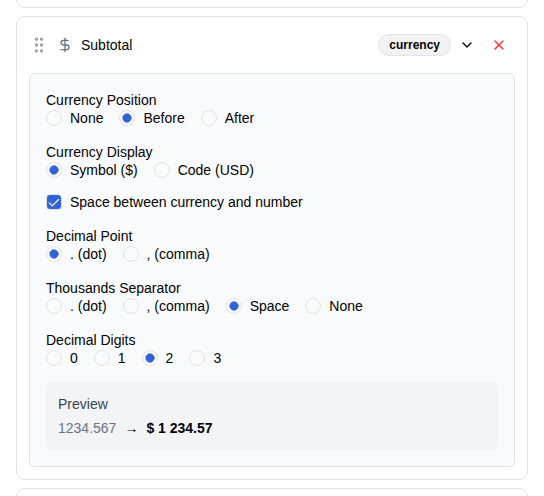
Currency Formatting
For price columns — such as Total, Subtotal, and Line Total — you can control how monetary values appear in the export. Options include currency position (before the number, after, or none), whether to show the currency symbol or its ISO code, the decimal point character, the thousands separator, and the number of decimal digits (0 to 3).
A live preview updates as you change settings, so you can see exactly how a value like 1234.50 will look before you export.
Date Formatting
For date columns, you can choose from 10 built-in presets covering common formats such as ISO (2026-03-25), European (25/03/2026), and US (03/25/2026), each available with or without the time portion.
If none of the presets fit your needs, you can write a custom format using PHP date codes. A clickable reference table lists the available codes and what they produce. A live preview shows your format applied to a sample date.
Status, Country, and State
For order status, country, and state/region columns you can choose between the raw code (for example processing or US) or a human-readable label (for example Processing or United States). Use labels when the export is meant for people to read, or codes when it will be processed by another system.
Payment Method
The payment method column can be displayed as the short symbol or identifier (for example stripe) or as the full descriptive text (for example Credit Card via Stripe).
Validation
The plugin checks your formatting settings for conflicts. For instance, you cannot use the same character for both the decimal point and the thousands separator. If a problem is detected, an error message appears directly on the affected column so you can correct it before running the export.