Filters
Export only the orders you need.
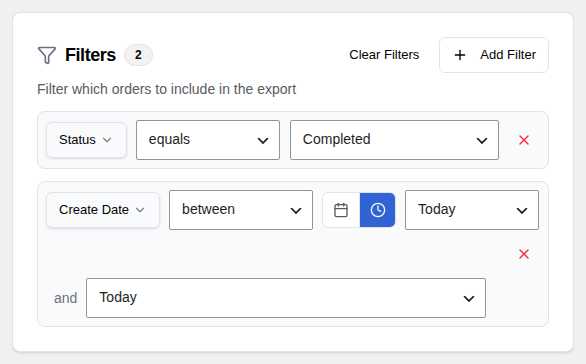
Adding Filters
Filters let you limit your export to a specific set of orders. To add a filter:
- In the Create tab, click Add Filter in the filter panel.
- Choose the field you want to filter by from the dropdown.
- Select an operator (for example, "equals" or "greater than").
- Enter the value to match.
Repeat to add more filters.
Filter Fields
You can filter orders by a wide range of fields, including:
- Date — Order date range
- Status — Completed, processing, refunded, etc.
- Order total — Greater than, less than, or between two amounts
- Payment method — Stripe, PayPal, bank transfer, etc.
- Products, variations, categories, tags — Specific items purchased
- Customer fields — Name, email, billing city, country, and more
- Custom meta — Any extra field stored on the order
Operators
The operators available depend on the type of field you are filtering:
- Text fields — equals, not equals, contains, does not contain, starts with, is empty, is not empty
- Number fields — equals, not equals, greater than, less than, between
- Date fields — equals, before, after, between
- List fields (status, payment method) — equals, not equals, is one of, is not one of
Multiple Filters
You can add as many filters as you need. When multiple filters are active, all of them must match — only orders that satisfy every filter will be included in the export.
For example: "Status = Completed" and "Date = Last 30 Days" will export only completed orders from the last 30 days.
Product Filters
When filtering by product, variation, category, or tag, a searchable dropdown appears. Type to search and select one or more items. The export will include only orders that contain at least one of the selected items.
Date Filters
Date filters offer two modes:
- Calendar — Pick a specific fixed date or date range.
- Relative — Choose a dynamic period like "Last 7 Days" that is calculated fresh each time the export runs. See Relative Date Filters for details.
Click the clock icon next to a date filter to switch between calendar and relative mode.